

Your annual report went to the auditor on Friday and came back on Monday with forty issues requiring correction before it could be accepted. Some are invalid tagging decisions, some are extension concepts that were never anchored, and some are filing requirements that had not been enforced earlier in the process.
None of these issues are particularly unusual. The problem is discovering them when the reporting deadline is measured in days rather than weeks. Once the reporting cycle becomes a race against the clock, every correction creates additional review, validation and sign-off work.
This is often the point at which organisations begin reviewing their reporting process. The goal is simple: identify filing issues earlier, allowing teams to correct them before submission to your auditor or regulator.
It quickly comes down to two options.
-
A SaaS platform: you license the software, your team handles the tagging in a browser, and you stay in control of the reporting timeline.
-
A managed tagging service: you send the report to an external provider, and they return a tagged, validated filing.
While both approaches can produce compliant filings, the trade-offs become clear after one reporting cycle.
A SaaS platform allows organisations to retain full control of the reporting process, make changes quickly, and build expertise within their own team. A managed tagging service reduces the need to maintain in-house tagging capability, but introduces a dependency on an external provider for filing preparation and late-stage amendments.
The right choice often depends on an organisation’s reporting volume, internal expertise, and how much control it wants to retain over the filing process.
What does XBRL reporting software actually do?
XBRL reporting software tags every figure and narrative statement in a financial or business report with machine-readable data, validates the result against the rules a regulator publishes, and writes out a file in the XBRL or inline XBRL (iXBRL) format required by the regulator.
Every tag comes from a taxonomy, the dictionary of concepts each collection publishes and maintains. XBRL itself is an open standard, free to use, governed by XBRL International, and reports may be delivered in plain XBRL or iXBRL depending on the mandate.
-
For finance teams, accountancy firms and auditors, the right tool determines whether financial and regulatory reports can be created and reviewed efficiently.
-
For software vendors, good XBRL components enable their platform to prepare, review, and consume the wide variety of iXBRL and XBRL filings worldwide.
All groups must have software that handles the differences between mandates and annual changes in taxonomies and filing rules. Finally, all software must be compliant with the technical specifications, and, depending on your reporting, may need to handle hundred-page annual reports and regulatory returns with millions of data points.
If this sound like a lot, it is! This guide helps you identify which features matter when you evaluate software. It explains how XBRL software works, where user needs differ, how XBRL and iXBRL formats change the workflow, how SaaS and managed-service delivery models compare, how to match a product to the filing regime you actually have to meet, and where CoreFiling’s Seahorse solution fits.
How is iXBRL tagging software used in reporting?
The work splits into four stages:
-
The software maps each number and each passage of narrative to a concept in the taxonomy.
-
A reviewer checks the tags the machine proposed and corrects the ones that miss.
-
The software runs the regulator’s rules over the tagged file and reports every breach.
-
The final stage writes the actual filing to be used, a .xbrl file or a .xbr report package for plain XBRL, an .html or .xbri file for iXBRL.
Strong products also show you what the regulator will see. Browser-based iXBRL viewers open a tagged report the way an analyst opens it, with every tagged fact clickable and the primary financial statements presented as normalised tables.
Who Buys XBRL Reporting Software?
Different buyers use XBRL software in very different ways, so the features that matter depend on who is doing the tagging.
-
Finance teams tag their own accounts, often just once a year. They need software that’s easy to pick up, supports review and approval workflows, and keeps pace with changing taxonomies.
-
Accountancy firms prepare filings for dozens or even hundreds of clients. They benefit from multi-user editing, work organisation, and pricing that scales with filing volume.
-
Auditors review XBRL files prepared by someone else. Their priority is independent validation, comparison, and review tools rather than tagging workflows.
-
Software vendors embed XBRL capabilities into their own products. They typically want an API or or while-labelled application.
-
Regulators, government agencies, and data collectors also need XBRL software, but this is to consume XBRL filings rather than create them.
XBRL vs. iXBRL: Which Format Does Your Software Need to Produce?
The format isn’t your choice. Your regulator decides, and your software has to produce the required output.
-
XBRL stores financial data in a machine-readable file designed for automated processing.
-
iXBRL embeds the same XBRL tags within an XHTML document, which enables browser-readable presentation and automated processing.
Both formats are widely used, but they’re typically required for different types of filings.
Banks and insurers often submit prudential returns in XBRL, including xBRL-CSV for high-volume granular data. Annual reports, financial statements, and many tax filings are commonly submitted in iXBRL because they need to serve both human readers and automated systems.
Many organizations need to support both. Some XBRL workflows start in PDF, Word or Excel and use conversion into iXBRL for filing, some start in data extracts from source systems. A bank, for example, may file quarterly regulatory returns in XBRL while publishing its annual report in iXBRL. Using software that handles both formats avoids maintaining separate reporting tools.
For a more detailed technical comparison, see our guide to XBRL vs. iXBRL.
Five Features to Evaluate in Any XBRL Reporting Software
Most XBRL platforms look similar on paper. They support major taxonomies, validate filings, and generate compliant reports.
The differences appear when deadlines get tight: a taxonomy changes weeks before filing, a late figure update triggers retagging, or a regulator rejects a rule your software missed. These are the five areas to evaluate before choosing an XBRL reporting platform.
1. Regulatory XBRL Taxonomy Support
A filing can only be accepted if the taxonomy used to create it is correct.
Taxonomies change regularly. Companies must comply with the tagging requirements in the relevant taxonomies, and those taxonomies are updated periodically to reflect regulatory changes and user feedback. ESMA releases a new ESEF taxonomy every year, the FRC update its UK taxonomies for HMRC filing similarly and European regulation of financial institutions has similar, or even more frequent, updates. Each new version can introduce new concepts, retire existing ones, and change the validation and filing rules.
If your software takes months to support a new taxonomy release, your reporting team is the one that absorbs the delay.
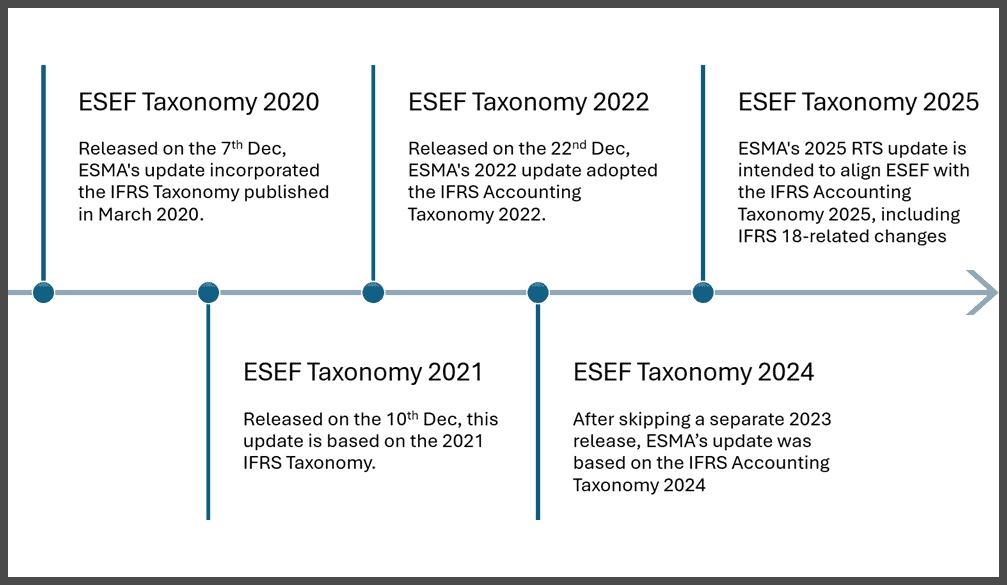
Example of annual release cycle for ESMA’s ESEF taxonomy.
Before choosing a platform, ask:
-
Which taxonomies does the software support today?
-
How quickly are new taxonomy versions added?
-
Does the vendor support every mandate your organization files under?
A tool designed around a single reporting obligation may work well initially, but it can become a limitation as your requirements expand. Companies operating across multiple jurisdictions often need broader coverage to avoid adding separate tools for every filing requirement.
How easy it is to create extensions to the XBRL taxonomy is another area worth testing.
Many ESEF filers create extension concepts for disclosures that are not covered by the IFRS taxonomy. Those extensions then need to be anchored to the closest standard concept so analysts can compare company-specific disclosures against industry standards.
Software that helps automate this process can save significant time during the tagging review process.
2. Validation That Finds Problems Before Submission
The worst time to discover a filing error is when a regulator tells you about it.
Validation exists to catch those problems before submission, but not every validation process checks the same things.
A strong XBRL platform should test four layers:
-
XBRL specification rules: Does the file follow the technical requirements of the standard?
-
Taxonomy rules: Are concepts used correctly and combined in valid ways?
-
Regulator business rules: Do the reported figures and disclosures make sense according to filing requirements?
-
Data collection filing rules: Are the specific technical and data requirements being met?
A file can pass one layer and fail another. A document may be technically valid but still rejected because figures do not reconcile, required disclosures are missing, or the filing does not comply with the regulator’s submission rules.
The key question for vendors is simple:
Does your validation engine match the regulator’s validation process?
Most regulators rely on commercial solutions. The closer your software matches the checks performed during submission, the fewer surprises your team will face.
Error messages matter just as much as error detection.
A useful error should tell the accounting team:
-
which concept caused the issue
-
where the problem appears
-
which rule was broken
-
how it can be fixed
An error message that only returns a technical reference number creates more work for the reporting team.
3. Integration and Automation
The biggest source of reporting errors is often not tagging itself. It is moving data between systems.
When figures are copied manually from an ERP, consolidation platform, or other source system into an XBRL tool, every additional step creates another opportunity for mistakes.
The strongest platforms streamline reporting by integrating XBRL tagging into existing workflows, supporting real-time validation, collaboration, and compliance with Inline XBRL (iXBRL) requirements.
That means:
-
fewer manual imports
-
fewer reconciliation issues
-
automatic report generation from computer-readable tags applied to financial data
-
tags that remain attached when figures change late in the reporting cycle
Software vendors have a different requirement. If an ERP, audit platform, or disclosure management system wants to add native XBRL functionality, it usually does not need another user interface. It needs an API or SDK that allows tagging and validation to happen inside its own product.
Before committing to an integration, ask about:
-
API limits
-
processing capacity
-
supported data formats
-
licensing structure
AI-assisted tagging is also becoming more common. In leading secure cloud-based platforms, these tools reduce manual tagging and improve data accuracy while suggesting concepts based on financial statements and disclosures, reducing the time needed for an initial tagging pass.
But the important metric is not how many tags the AI suggests. It is how many suggestions survive human review. A tool that produces inaccurate suggestions simply moves the workload from tagging to correcting.
4. Collaboration and Workflow Management
An annual report is rarely created by one person. Finance prepares the statements. Legal reviews disclosures. Investor relations manages shareholder-facing content. Auditors examine the final output.
A reporting platform built around a single user creates unnecessary bottlenecks.
The right workflow should allow multiple stakeholders to review, approve, and comment without losing control of the filing process.
Version control becomes especially important near the deadline.
A last-minute adjustment to a financial figure should update every connected tagged disclosure automatically. If every change requires manual retagging, the final days before submission become a race against errors.
Audit trails are equally important.
The platform should record:
-
what disclosure changed
-
who changed a tag
-
when the change was made
-
which review comments were added
-
when validation checks were completed
That record helps auditors verify the process and gives companies evidence if a regulator questions a filing years later.
5. XBRL Certification and Vendor Credentials
XBRL compliance is easy to claim. Verifying it is harder. XBRL International operates a certification program for reporting software, where products are tested against the XBRL standard. Certification gives buyers an independent way to confirm that a platform meets technical requirements and more authority when assessing vendor claims.
Security credentials matter as well. XBRL filings often contain unpublished financial information, which makes vendor security practices critical. Organizations using SaaS reporting platforms should evaluate certifications such as ISO 27001, and enterprise services and support options should be available for teams handling sensitive filings, while also understanding how the vendor protects sensitive data.
Vendor involvement in the XBRL standard can also reveal technical depth. Most software companies implement XBRL specifications. A smaller group contributes directly to developing them.
CoreFiling has been involved in XBRL development since the early stages of the standard.
The company co-invented Inline XBRL (iXBRL) with HMRC, and Philip Allen, CoreFiling’s Executive Chairman, is the editor of the Inline XBRL specification. That involvement gives the company direct insight into how the standard develops and how regulators apply it.
Match the Software to Your Filing Mandate
Your filing mandate determines the format, taxonomy, and validation rules your software must support. Those requirements eliminate many options before you ever compare features.
iXBRL for Tax and Registry Filings
Tax authorities and company registries use iXBRL because the same document can be read by people and processed by machines.
HMRC has required iXBRL for UK Corporation Tax filings and accounts since 2011, while Companies House also accepts iXBRL accounts. The Netherlands uses a similar approach through KVK, where companies submit annual accounts through the Standard Business Reporting framework.
Consumers of annual reports value consistency in filings, whether preparing a single set of accounts or thousands, your software should enable you to roll-forward your tagging from one year to the next and AI assistance should take into account the tagging of your peers.
Inline XBRL for Listed Company Reporting
Public companies in the US, EU, and UK use inline XBRL for annual financial reporting.
The SEC requires US registrants to file in inline XBRL using US GAAP or IFRS taxonomies. EU issuers follow the European Single Electronic Format (ESEF), while UK companies use UKSEF, the UK extension of ESEF.
Companies listed across multiple markets need software that can handle different taxonomies, extension concepts, and reporting requirements from one platform. Otherwise, teams end up managing multiple tools and duplicate review processes.
CSRD Sustainability and Financial Reporting
The Corporate Sustainability Reporting Directive extends structured reporting into sustainability disclosures. The rules are in place and so are the European Sustainability Reporting Standards (ESRS), full implementation is on the horizon for EU companies.
CSRD uses the same iXBRL framework as ESEF, with companies expected to tag sustainability information against the ESRS taxonomy once the digital tagging requirements take effect.
For companies already using ESEF software, future ESRS support should be part of the buying decision. A platform that can support both financial and sustainability reporting now reduces the need for another implementation later.
XBRL for Banks and Insurers
Banks and insurers work with some of the most demanding XBRL requirements because regulatory filings involve thousands of data points submitted monthly, quarterly and annually.
In Europe, EBA and EIOPA maintain taxonomies for banking and insurance reporting, including Solvency II filings, while UK firms report under local versions managed by regulators including the FCA, PRA, and Bank of England. Several other jurisdictions have national reporting templates that extend the EU requirements to meet national needs.
These teams need software built for automation, large data volumes, and formats such as xBRL-CSV. Integration with source systems matters more than manual tagging workflows because reporting happens continuously throughout the year.
SaaS vs. Managed Tagging Service: Which Fits Your Team?
The right delivery model depends on where tagging expertise sits inside your organization and which users need direct control.
A SaaS platform gives your team direct control over the reporting process, and it should be easy to use for business users managing filings internally. You manage tagging internally, make last-minute changes without waiting on an external provider, and reduce the cost per filing as volume increases.
The trade-off is expertise. Someone needs to understand the taxonomy, maintain tagging quality, and keep up with regulatory changes.
A managed tagging service provides specialist support without requiring permanent in-house knowledge. You send the report, and the provider returns a tagged and validated filing.
The downside appears during deadline pressure, when every late change has to go through the provider.
Many organizations strive for a hybrid approach: a provider handles the first filing, then the internal team uses that report as a template for future cycles. Some will also use external voluntary audit or assurance to ensure the quality of their report.
Three factors usually decide the right choice:
-
Annual filing volume: Dependent on your circumstance, more filings may mean outsourcing is required to reduce pressure on the reporting function or it may justify a platform investment for internal use.
-
Time between sign-off and deadline: Short windows favour internal control.
-
Internal expertise: Limited knowledge favours managed support.
A company filing once a year with a small finance team may benefit from outsourcing. An accounting firm handling hundreds of filings will always want the speed and repeatability of a dedicated platform.
How CoreFiling’s Seahorse Is Built for Complex XBRL Reporting?
XBRL reporting becomes difficult when the filing process involves multiple mandates, changing taxonomies, and several teams reviewing the same report.
A basic tagging tool may handle a single filing, but it quickly becomes harder to manage when reporting requirements expand, regulators update taxonomies, or late changes need to move through the process without breaking validation.
That is where Seahorse is designed to help.
CoreFiling combines XBRL and iXBRL reporting, validation, and review workflows in one platform, giving finance teams, service providers, auditors, and software vendors the same reporting infrastructure.
With Seahorse, teams can:
- Prepare and validate filings internally while keeping control of the reporting timeline.
- Support multiple reporting mandates without maintaining separate tools for every taxonomy.
- Catch validation issues before submission using True North, the same validation engine used by several of the largest XBRL and iXBRL data collectors.
- Embed XBRL functionality directly into existing software through APIs.
The platform is backed by CoreFiling’s long history in the digital data collection ecosystem. The company has contributed to XBRL standard development, supports UKSEF taxonomy work with the FRC, holds XBRL International’s Report Creation Software certification, and maintains ISO 27001 certification for information security.
If your team is evaluating XBRL software, start with the mandates you file under, the systems you already use, and the level of control you need. Talk to CoreFiling about how Seahorse can fit into your reporting and compliance workflow.
Frequently Asked Questions: XBRL Reporting Software
What is XBRL reporting software?
XBRL reporting software adds machine-readable tags to financial and business reports, validates them against regulatory rules, and generates the required filing format. The tags come from taxonomies that define the concepts used by regulators for annual reports, tax filings, and regulatory returns.
What features should I look for in XBRL software?
Look for broad taxonomy support, fast updates when standards change, and validation that matches the requirements of your specific regulators. Also consider integrations, collaboration tools, audit trails, and credentials such as XBRL International’s software certification and ISO 27001.
Is XBRL reporting software the same as iXBRL software?
iXBRL embeds XBRL tags inside a human-readable XHTML document, while standard XBRL creates a machine-readable data file. Platforms will usually support one or other of the formats, but the right choice depends on the filing requirements set by your regulator. CoreFiling’s platform supports both.
Is CoreFiling XBRL certified?
Yes. CoreFiling’s Seahorse holds XBRL International’s Report Creation Software certification, confirming that it has been tested against the standard. The company also holds ISO 27001 certification for information security and contributes to XBRL standard development.
Which regulators require XBRL or iXBRL filing?
iXBRL is generally used by securities regulators, tax authorities and company registries, examples are the SEC (US), ESMA (EU), HMRC (UK) and KVK (NL). XBRL is used by financial supervisors worldwide, examples include the EBA, EIOPA and their national banking and insurance regulators.
What is the difference between SaaS XBRL software and a managed tagging service?
SaaS software lets your team handle tagging internally, giving you control and lower outward costs. A managed tagging service outsources the process to specialists, making it better suited for organizations with limited XBRL expertise or occasional filing needs.